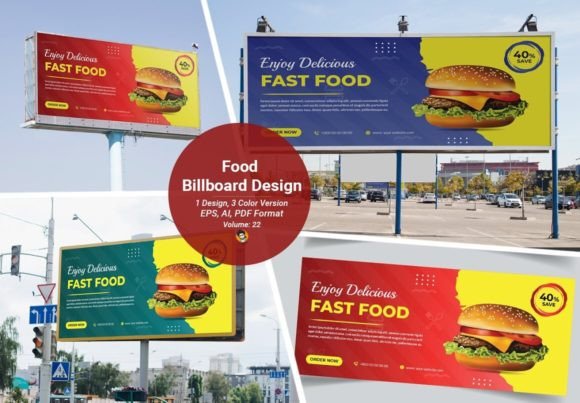
Food Billboard Design: High-Impact Vector Templates
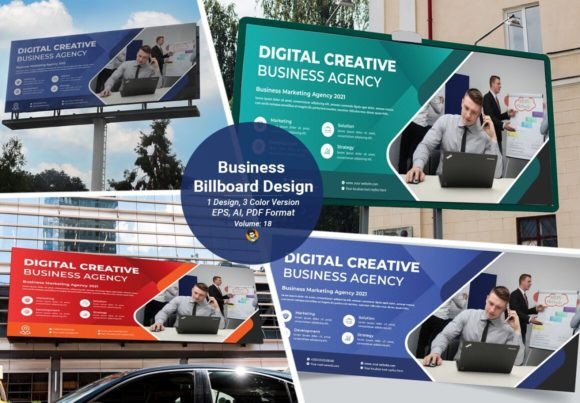
In the competitive landscape of outdoor advertising, visual clarity is not just an advantage; it is a necessity. A Food Billboard Design serves as the first point of contact between a culinary brand and potential customers driving past at high speeds. The challenge for designers and business owners alike is creating a layout that captures attention instantly while remaining legible from a distance. This is where professional-grade templates, such as the 3 Color Version Volume 22, become invaluable assets. By leveraging pre-designed, fully editable vector files, creators can bypass the initial stages of conceptualization and move directly to customization, ensuring high-quality output with minimal friction.
The Power of Simplified Color Palettes
One of the most striking features of this specific design volume is its adherence to a three-color scheme. In graphic design, particularly for large-format printing, restraint often yields better results than excess. A limited palette forces the designer to focus on contrast, hierarchy, and composition. When applied to food advertising, three well-chosen colors can evoke specific appetites and emotions without overwhelming the viewer. For instance, a combination of warm reds, crisp whites, and deep browns might suggest a premium burger joint, while fresh greens, yellows, and whites could signal a healthy salad bar.
Using a 3 Color Version also has practical benefits for printing costs and consistency. Fewer ink plates mean lower production costs for large-scale runs, and it reduces the risk of color registration errors during the printing process. Furthermore, a simplified color scheme ensures that the billboard remains visually cohesive even when viewed from hundreds of feet away. Complex, multi-colored designs can sometimes appear muddy or chaotic at a distance, whereas a bold, three-tone layout retains its integrity and impact.
Technical Precision and Scalability
The technical specifications of these templates are designed to meet the rigorous demands of large-format printing. With a size of 70x30 inches and a resolution of 300 DPI, the files are ready for high-definition output. It is crucial to understand that billboards are not viewed up close; however, the source files must maintain high fidelity to allow for scaling. If a designer needs to adapt the design for a smaller poster, a digital ad, or a menu board, the vector nature of the file ensures that no quality is lost.
Vector graphics, stored in AI, EPS, and PDF formats, use mathematical equations to define shapes and lines rather than pixels. This means you can resize the Food Billboard Design to any dimension—from a business card to a building wrap—without experiencing pixelation or blurriness. For professionals working across multiple media channels, this scalability is a significant time-saver. You create once and deploy everywhere, maintaining brand consistency across all touchpoints.
Compatibility and Ease of Customization
Accessibility is a key consideration when selecting design resources. This volume is optimized for Adobe Illustrator CS4 and remains fully compatible with newer versions, including CS5, CS6, and the Creative Cloud (CC) suite. This backward compatibility is essential for agencies or freelancers who may be working with older hardware or software licenses. It ensures that the file structure remains intact, preventing the common issues associated with opening newer files in older software environments.
The term "easy customization" is often overused in digital marketplaces, but in this context, it refers to the logical layering and organization of the vector elements. Text fields, image placeholders, and color swatches are typically separated into distinct layers. This allows users to quickly swap out generic food photography for their own product shots, adjust typography to match brand guidelines, and tweak color values without disrupting the overall layout. The inclusion of a help file with FREE download links for any required fonts further streamlines the workflow, eliminating the hassle of tracking down missing typefaces.
Practical Applications Across Industries
The versatility of these templates extends beyond traditional fast-food chains. Here are several real-world applications where a Food Billboard Design can drive results:
- Restaurant Launches: New eateries can use these templates to create immediate brand recognition. By inserting high-quality images of signature dishes and adjusting the three-color palette to match their interior decor, they can generate buzz before opening day.
- Food Trucks and Pop-Ups: Mobile vendors need agile marketing materials. The editable nature of the files allows them to update menus or promote daily specials quickly, ensuring their outdoor signage remains relevant and engaging.
- Catering Services: Corporate caterers can adapt the design for trade shows or expos. The clean, professional look of a three-color design conveys reliability and sophistication, appealing to business clients.
- Educational Institutions: Culinary schools can use these layouts for recruitment campaigns or event promotions. The structured design helps highlight key information such as enrollment dates or open house events clearly.
Enhancing Brand Communication
Effective advertising is not just about aesthetics; it is about communication. A well-structured billboard design guides the viewer’s eye through a specific narrative arc. Typically, this involves a dominant visual element (the food), a concise headline, and a clear call to action. The Volume 22 templates are engineered to support this hierarchy. By providing a solid foundational layout, they allow marketers to focus on the messaging rather than the mechanics of design.
Moreover, the consistency provided by using a standardized template helps in building brand equity. When customers see similar color schemes and layout structures across different locations or media, it reinforces brand recall. For franchises or multi-location businesses, this consistency is vital. It ensures that whether a customer is in New York or Los Angeles, the visual experience remains uniform, fostering trust and familiarity.
Important Considerations for Users
While these templates offer significant advantages, users must be aware of certain limitations and best practices. First, it is important to note that photos are not included in the download. This is a standard practice in template sales to avoid licensing issues with stock imagery. Users must source their own high-resolution images that fit the aesthetic of the design. Poor-quality photos can undermine even the best vector layout, so investing in professional food photography is recommended.
Additionally, while the files are compatible with CS4 and above, users should ensure their software is updated to the latest patch level to avoid minor rendering glitches. When customizing, always double-check font licenses. Although the help file provides download links, commercial use of certain fonts may require purchasing a separate license. Finally, before sending the final file to print, convert all text to outlines and embed any linked images to prevent missing font or image errors during the printing process.
In conclusion, the Food Billboard Design 3 Color Version Volume 22 represents a practical solution for professionals seeking efficiency without compromising on quality. By combining technical precision with aesthetic simplicity, it empowers creators to produce compelling outdoor advertisements that resonate with audiences. Whether you are a seasoned graphic designer or a small business owner managing your own marketing, these editable vector files provide the flexibility and professionalism needed to stand out in a crowded marketplace.